|
0 registered members (),
5,796
guests, and 4
spiders. |
|
Key:
Admin,
Global Mod,
Mod
|
|
|
 trace problem...
#131023
trace problem...
#131023
05/22/07 02:13
05/22/07 02:13
|
Joined: Feb 2006
Posts: 2,185
mpdeveloper_B
 OP
OP
Expert
|
OP
Expert
Joined: Feb 2006
Posts: 2,185
|
ok, here's what i want to do: i have a canon at the bottom of the screen, and i want to do a trace from the canon to where it's tilt is facing, in other words i want a line to be traced from the canon's position and to be oriented to the canon's tilt, like the color dotted line in this picture:  for the moment it doesn't need to bounce off walls, but it does need to trace to the wall, in other words, i need a puzzle bobble style trace from the canon to where the canon is facing, using the canon's tilt angle (using X and Z for 2d alignment)
- aka Manslayer101
|
|
|
Re: trace problem...
[Re: mpdeveloper_B]
#131024
05/22/07 09:03
05/22/07 09:03
|
Joined: Mar 2007
Posts: 776
Poor village - Poland ;)
tompo
User
|
User
Joined: Mar 2007
Posts: 776
Poor village - Poland ;)
|
I'm not sure... but if this is "top view" so everything has the same "z" value then using the mouse or keys you changing cannon's pan so it's simple trace Code:
	vec_set(my_target_start, my.x);
	vec_set(my_target_end, nullvector);
	my_target_end.x = 5000;
	vec_rotate(my_target_end, my.pan);
	vec_add(my_target_end, my_target_start);
	c_trace(my_target_start,my_target_end, IGNORE_ME| ignore_passable|use_polygon);

if(result !=0) then...
if(you==wall){bounce_vector;} //start traceing ahead from target (f.e. dummy entity), set his pan the same as cannon start pan and turn him by difference between his pan and canon actual pan *-1
if(you == bubble){do something;}//fire, make effect, add points, remove you...etc

Last edited by tompo; 05/22/07 13:01.
Never say never.
|
|
|
Re: trace problem...
[Re: tompo]
#131025
05/22/07 13:31
05/22/07 13:31
|
Joined: Feb 2006
Posts: 2,185
mpdeveloper_B
OP
Expert
|
OP
Expert
Joined: Feb 2006
Posts: 2,185
|
it will be extremely helpful, but there is one problem, instead of the trace being in front of the canon, it's at the canon's side rather than at it's front. like this: 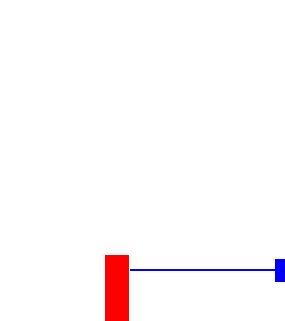 the blue line is showing what the trace is doing, and the blue box is the entity that i placed on the target location to see where the trace is. i tried changing it so that it was on the "top" view, but it works best when i am using tilt, and the level is 2d oriented on the "back" view.
- aka Manslayer101
|
|
|
Re: trace problem...
[Re: mpdeveloper_B]
#131026
05/22/07 13:35
05/22/07 13:35
|
Joined: Mar 2007
Posts: 776
Poor village - Poland ;)
tompo
User
|
User
Joined: Mar 2007
Posts: 776
Poor village - Poland ;)
|
rotate your canon in MED so the front will be the front not right side  and you may rotate your all level to put them on the ground (looking down from top view)... then your only problem will be pan not tilt And of'course this dummy entity is for help... you may replace it with vectors
Last edited by tompo; 05/22/07 13:43.
Never say never.
|
|
|
Re: trace problem...
[Re: mpdeveloper_B]
#131027
05/22/07 13:35
05/22/07 13:35
|
Joined: Feb 2006
Posts: 2,185
mpdeveloper_B
OP
Expert
|
OP
Expert
Joined: Feb 2006
Posts: 2,185
|
ah, nevermind, i fixed the problem, like this: Code:
vec_set(my_target_start, my.x);
vec_set(my_target_end, my.x);
my_target_end.z += 5000;
vec_rotate(my_target_end, my.pan);
vec_add(my_target_end, my_target_start);
c_trace(my_target_start,my_target_end, IGNORE_ME| ignore_passable);
i will also try your other code for "bouncing" it off the walls
- aka Manslayer101
|
|
|
Re: trace problem...
[Re: mpdeveloper_B]
#131028
05/22/07 13:45
05/22/07 13:45
|
Joined: Feb 2006
Posts: 2,185
mpdeveloper_B
OP
Expert
|
OP
Expert
Joined: Feb 2006
Posts: 2,185
|
ok, one last question i already have blocks being created in the level and their colors are randomized, etc, however, how do i get them to turn to the target? i tried this: Code:
vec_set (temptarg, target.x);
vec_sub (temptarg, my.x);
vec_to_angle (my.pan, temptarg);
but because i'm using Z instead of X it doesn't work
Last edited by Manslayer101; 05/22/07 13:51.
- aka Manslayer101
|
|
|
Re: trace problem...
[Re: mpdeveloper_B]
#131029
05/22/07 13:53
05/22/07 13:53
|
Joined: Mar 2007
Posts: 776
Poor village - Poland ;)
tompo
User
|
User
Joined: Mar 2007
Posts: 776
Poor village - Poland ;)
|
Use models not blocks... You can't assign actions (behaviour) to blocks
For models...
vec_set(temp,you.x); //find target
vec_sub(temp,my.x); //check me
vec_to_angle(my.pan,temp); //turn me (look at You/target...etc)
Last edited by tompo; 05/22/07 13:54.
Never say never.
|
|
|
Re: trace problem...
[Re: tompo]
#131030
05/22/07 13:57
05/22/07 13:57
|
Joined: Mar 2007
Posts: 776
Poor village - Poland ;)
tompo
User
|
User
Joined: Mar 2007
Posts: 776
Poor village - Poland ;)
|
 it should works in any directions... but how i told you... put your level on the ground to see it from the top view and you'll avoid a lot of problems with vectors, angs...etc Pan will be the pan, ahead will be X, and tilt will be always 0
Last edited by tompo; 05/22/07 14:01.
Never say never.
|
|
|
Re: trace problem...
[Re: tompo]
#131031
05/28/07 23:24
05/28/07 23:24
|
Joined: Feb 2006
Posts: 2,185
mpdeveloper_B
OP
Expert
|
OP
Expert
Joined: Feb 2006
Posts: 2,185
|
well i was using models, but the models were block shapes, this code works great, but how do i get them to bounce again?
- aka Manslayer101
|
|
|
|








