|
3 registered members (vince, VoroneTZ, 1 invisible),
2,903
guests, and 4
spiders. |
|
Key:
Admin,
Global Mod,
Mod
|
|
|
 Torque to Degree of Rotation
#66916
Torque to Degree of Rotation
#66916
03/17/06 21:37
03/17/06 21:37
|
Joined: Mar 2003
Posts: 4,427
Japan
A.Russell
 OP
OP
Expert
|
OP
Expert
Joined: Mar 2003
Posts: 4,427
Japan
|
This is a general physics question. If Torque = AppliedForce * DistanceFromPointWhereForceIsApplied then how do you use this figure to determin how much to rotate an object? (in degrees per tick) For example: 
Last edited by A.Russell; 03/17/06 21:40.
|
|
|
Re: Torque to Degree of Rotation
[Re: slacer]
#66918
03/20/06 04:07
03/20/06 04:07
|
Joined: Mar 2003
Posts: 4,427
Japan
A.Russell
OP
Expert
|
OP
Expert
Joined: Mar 2003
Posts: 4,427
Japan
|
Thanks, but not quite the answer I was looking for. I am not using Newton or 3DGS physics in this case, so I need to know how to translate the torque force into rotational movement (would you still call it velocity when it is rotational?).
No doubt the mass will affect it and the amount of time the torque is applied would add to amount the thing rotates, otherwise I could send the Earth off its orbit when I sneeze, but what is the formula? (just the basic formula without any other forces will do)
Last edited by A.Russell; 03/20/06 10:57.
|
|
|
Re: Torque to Degree of Rotation
[Re: A.Russell]
#66919
03/20/06 05:38
03/20/06 05:38
|
Joined: Mar 2003
Posts: 4,427
Japan
A.Russell
OP
Expert
|
OP
Expert
Joined: Mar 2003
Posts: 4,427
Japan
|
I did find this: Quote:
rot. a = torque / I, or
torque = I*(rot. a)
(the distribution of mass affects I, so let's just say the mass is equally distributed)
So in my example,
rot.a = 500/10
so,
rot.a = 50 degrees per tick added to the rotational velocity.
Is that right?
Last edited by A.Russell; 03/20/06 05:41.
|
|
|
Re: Torque to Degree of Rotation
[Re: A.Russell]
#66923
03/31/06 15:50
03/31/06 15:50
|
Joined: Aug 2002
Posts: 681
Massachusetts, USA
Ichiro
User
|
User
Joined: Aug 2002
Posts: 681
Massachusetts, USA
|
You may have already considered this, but your diagram suggests a collision (of a point mass with a spherical mass) that's perfectly tangent to the surface of the sphere. While the elastic point-mass/spherical-mass model portion of the model is a good approximation (I think it does make sense to model Entity A as a sphere and Entity B as a point), shouldn't you also include a factor for the angle of incidence (theta, below), as it's likely that Entity B is likely to strike Entity A at a non-90-degree angle? 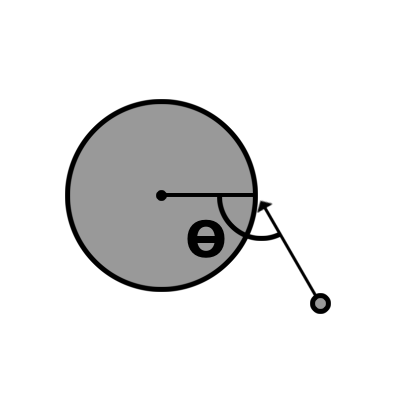 For a collision that's not perfectly tangential to the sphere, your angular momentum transfer will be less (and the linear momentum transfer greater), so the actual momentum transfer will occur more like... angular_momentum_change = your_angular_formula * sin(theta) linear_momentum_change = your_linear_formula * cos(theta) ...so that in a head-on collision, there's no change in angular momentum (it's all linear), whereas in a tangential collision, there's no change in linear momentum (it's all angular). So, none of that actually answers your question, and only makes your life harder, but it may help in the long-run(?)
|
|
|
Re: Torque to Degree of Rotation
[Re: A.Russell]
#66925
04/02/06 15:48
04/02/06 15:48
|
Joined: Mar 2003
Posts: 4,427
Japan
A.Russell
OP
Expert
|
OP
Expert
Joined: Mar 2003
Posts: 4,427
Japan
|
Ahem, no cigar. At the moment I have it set up to calcualte for stationary objects only. The linear force is fine, and behaves well. However, it get's too much angular force and always spins to the left. I wonder if I got this part of the formula correct: //(moment of inertia) I = kg * m^2 moment_of_inertia = my.mass * pow(my.diameter,2); What is "m"? I thought it would be the diameter, but I was only guessing because "rotational inertia (measured by mass and the distribution of mass), I" though I don't really understand well. Here is the whole mess: Code:
var test_var;
var test_var2;

var force[3];
var temp_force[3];
var moment_of_inertia;
var torque[3];
var rot_a[3];
var distance_from_centre;
var angular_force[3];
var dot_product;

function collision_event()
{

		if( (event_type == event_entity) && my.push >= you.push)
		{


//				spaceship_event_hit+=1;
//				if(spaceship_event_hit == 1)
//				{

					//calculate the impact force
					//force = mass * velocity
					force = my.mass * vec_length(my.velocity);

					//adjust that by the angle of the strike
					//compare the struck surface normal to the direction traveling
					//start with the dot product of the two vectors
					vec_set(temp, NORMAL);
					vec_set(temp2, my.DRIFT_VECTOR);
					if(temp || temp2) //no dividing by zero
					{
						dot_product = acos(vec_dot(temp.x,temp2.x)/(vec_length(temp.x)*vec_length(temp2.x)));
					}

					//for collision with stationary objects
					force = force * (cos(180 - dot_product));


					test_var = force;


				//linear change
						//make it bounce
						vec_to_angle(temp,bounce);
						temp2.x = vec_length(my.velocity);
						temp2.y = 0;
						temp2.z = 0;

						vec_scale(temp2,0.6); //bouncyness


						vec_rotate(temp2,temp);
						vec_set(my.drift_vector,temp2);


//********THIS IS THE DIFFICULT BIT************************************************************************
				//we also want it to change angular velocity
				//check position of strike against velocity

				//for collision with stationary objects

				//(moment of inertia) I = kg * m^2
				moment_of_inertia = my.mass * pow(my.diameter,2);

				//distance_from_centre
				vec_diff(temp, my.x, target);
				distance_from_centre = vec_length(temp);

				//Force
				vec_set(temp, my.velocity);
				vec_scale(temp, my.mass);
				vec_set(force, temp);


				//torque = force * distance_from_centre;

				vec_set(temp, force);
				vec_scale(temp, distance_from_centre);
				vec_set(torque,temp);


				//rot. a = torque / I, or
				//torque = I*(rot. a)

				//rot_a = torque/moment_of_inertia

				if(moment_of_inertia) //don't divide by zero
				{
					rot_a.pan = torque.pan / moment_of_inertia;
					rot_a.tilt = torque.tilt / moment_of_inertia;
					rot_a.roll = torque.roll / moment_of_inertia;
				}


				//convert from radians to degrees
				vec_set(temp,rot_a);
				vec_scale(temp, 57.296);
				vec_set(angular_force,temp);


				//angular_momentum_change = your_angular_formula * sin(theta)
				vec_scale(angular_force, sin(180 - dot_product));

				//phew! Now add that to the ship's angular velocity
				vec_add(my.ROT_VELOCITY, angular_force);


//			}
		}
|
|
|
|








